The challenge
Two places, one community.
A Minecraft community often lives in two places at once: on the server and in Discord. Keeping them connected means solving a handful of practical problems, reliably and without giving away more control than necessary.
One conversation, two places
Players in the game and members in Discord should be able to talk with each other, instead of the community splitting into two separate conversations.
Visibility outside the game
Members want to know whether the server is reachable and what is happening on it without logging in to check.
Staff actions from Discord
Authorized staff need a few everyday administrative actions where they already coordinate, without handing out full console access.
Hosted by the operator
Server operators need to run the application themselves and decide which channels, roles, and features it uses.
Safe behavior when connections fail
When a connection drops mid-request, the application should not blindly repeat an action that may already have gone through.
Implemented capabilities
Shared conversations, visible activity, and scoped staff tools.
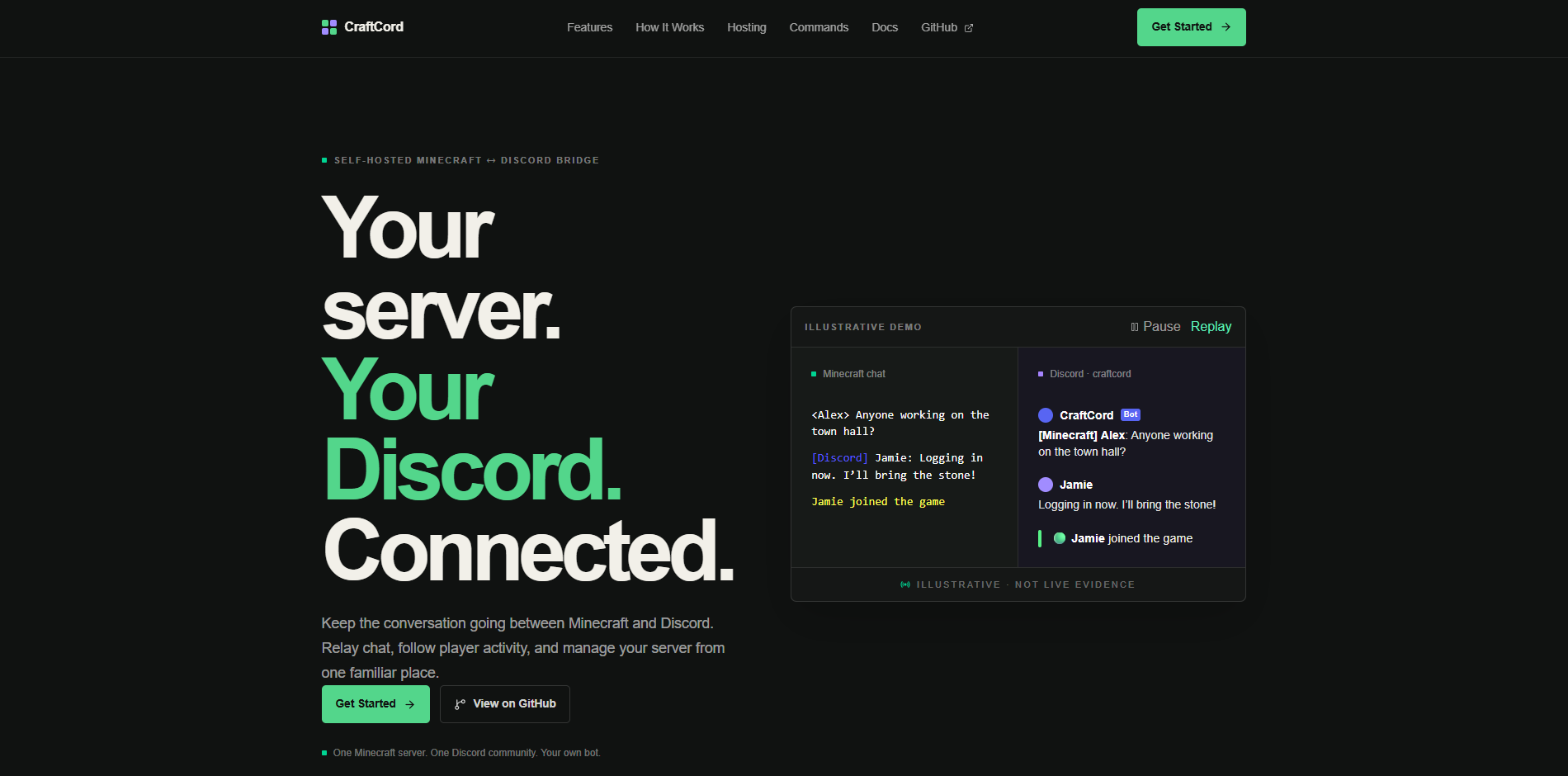
CraftCord runs alongside the server and brings the useful parts of it into Discord, with each feature configurable by the operator.
Two-way chat bridge
Community members can take part in the same conversation whether they are in the game or in Discord.
- Minecraft chat is read from the server logs and forwarded to a configured Discord channel
- Authorized Discord messages are relayed into Minecraft through its remote console (RCON) protocol
- Discord-specific formatting is converted into readable in-game text
- Bot and webhook messages are ignored on the return path to prevent chat loops
- Forwarded Discord messages suppress actual mention notifications
Player identity presentation
Messages from the game can appear in Discord under the player’s own name and face. The feature is implemented with automated tests; the README still lists live verification as pending.
- Optional webhook delivery shows a player’s username and skin-head avatar
- Chat and event identity modes are configured independently
- Slash-command replies and server-status messages keep CraftCord’s own identity
- Profile lookups use bounded caching and timeout handling
Server status and activity
A single, always-current place in Discord to see whether the server is up and who is playing.
- An automatically updated, pinned Discord status message
- Online or offline based on observed RCON reachability, not exact Minecraft process uptime
- Version, player count, latency, and a player-name sample that may not list every player
- Join, leave, death, and advancement event embeds
- SQLite keeps the pinned message ID and observed online-since state
Role-controlled administration
Scoped administration through Discord: staff get specific actions, not the whole server console.
- Slash commands for the player list, server status, broadcasts, kick, ban, pardon, and whitelist changes
- Diagnostic and command-sync tools for administrators
- Commands are restricted to the configured Discord server
- Member, moderator, and administrator tiers control who can use which actions
- Minecraft usernames and moderation input are validated, and there is no unrestricted raw-console command
Configurable self-hosting
Each operator runs their own instance, connecting one Discord server to one Minecraft server.
- Configuration through environment variables
- Configurable roles, channels, status refresh interval, and optional features
- Local server-log reading, plus an implemented Pterodactyl WebSocket log source not yet live-verified
- Generic console mirroring is opt-in and disabled by default
- Requires connectivity to the game server and an appropriate log source
CraftCord targets vanilla Minecraft Java 26.2 with English log formats and needs no Minecraft mod or plugin for that integration. It does not support Bedrock or promise compatibility with modified server logs, and it does not include multi-server management, account linking, a web dashboard, or browser-based configuration.
Technical highlights
The engineering behind the integration.
Three parts of the project that keep it responsive, cautious when things go wrong, and simple to run.
Asynchronous integration architecture
Chat, status updates, and staff commands can all happen at the same time, and each part of the application has a clear job, which keeps it easier to maintain and extend.
- 01
Discord
Slash commands, messages, and the status channel arrive through discord.py.
- 02
Cogs
Modular cogs separate command handling from event handling.
- 03
Services
Dedicated services own RCON, server status, log sources, and player identities.
- 04
Minecraft
Server logs are read for activity, and RCON carries messages and approved actions.
Python’s asyncio lets background work, such as reading logs and refreshing the status message, run alongside network requests to Discord and the Minecraft server without one blocking the other.
Careful failure handling
When a connection drops, it is not always clear whether an action went through. CraftCord treats that uncertainty carefully instead of retrying and risking a duplicate ban or repeated message.
A custom asynchronous RCON client sends one request at a time and manages timeouts and reconnection. Commands that change the server, and chat messages sent into the game, are not silently replayed when their delivery is uncertain.
Webhook delivery to Discord distinguishes a confirmed failure from an uncertain result, which reduces the risk of duplicate posts. These choices lower the chance of repeated actions; they are not a guarantee of delivery or exactly-once execution.
Lightweight persistence and configuration
The application remembers what it needs across restarts and keeps each installation’s settings separate from the code, so operators can set it up without editing source files.
SQLite stores a small amount of operational state, such as the pinned status message and the observed online-since time, so the bot picks up where it left off after a restart. It is not used as a chat archive.
Environment-based configuration keeps channels, roles, and features out of the application code, and hashed dependency lockfiles support reproducible installation.
Technology
Built with
- Application
- Python, asyncio, discord.py
- Integrations
- Discord API and webhooks, Minecraft RCON, mcstatus, aiohttp, Minecraft Services profile lookup, Minotar avatar images
- Persistence and configuration
- SQLite / aiosqlite, python-dotenv
- Development workflow
- GitHub, pytest, GitHub Actions workflow, pip-audit tooling, hashed dependency lockfiles
Verification and status
Pre-release, with testing recorded so far.
CraftCord is in pre-release development with no published release. The repository README records what has been tested by the operator and what still needs verification.
Recorded in the README
Successful operator-run tests against:
- A disposable vanilla Minecraft Java 26.2 server
- Python 3.13.7 on Windows
- Local log tailing
- A Discord test community
- In-game confirmation of Discord-to-Minecraft chat rendering
Still to verify
Remaining verification identified in the README:
- Player-identity webhook behavior in a live environment
- Pterodactyl log streaming
- Other operating systems and Python versions
- Runtime rejection in a foreign Discord server
The repository includes automated tests and a GitHub Actions workflow. Their current passing status is not reported here, and the README marks remote CI execution as unverified. The repository is public, and license selection is still pending.
What this demonstrates
The same skills, applied to your project.
CraftCord is an independent project, not a client engagement, but the work behind it applies well beyond Minecraft. These are capabilities it demonstrates and the kind of work I can build for you.